How to prefix route a CAKEPHP 3 REST API
In this follow-up post to
How to use a CakePHP 3 REST API
we will implement a
Prefix Route
so we can benefit from clean controller logic separation and limit access
to our API resources through (only) /api prefixed URLs.

Before We Begin
This is part three of the CakePHP 3 REST API tutorial series:
- How to build a CakePHP 3 REST API in minutes
- How to use a CakePHP 3 REST API
- How to prefix route a CakePHP 3 REST API
- How to add JWT Authentication to a CakePHP 3 REST API
- How to make your CakePHP 3 API produce JSON API
- How to use a CakePHP API as the data backend for Ember in 30 minutes
Before starting this tutorial either:
- Complete the previous posts
- Start fresh by using these end-state application sources, composer installing and running the database migration
Creating the Prefix Route
1. Remove previous routing
Remove the general API routing created in the previous tutorial by removing these lines from your
config/routes.php file:
Router::extensions(['json', 'xml']);$routes->resources('Cocktails');2. Create the prefix route
Now create a new /api prefixed route we will use for all of our API resources by adding the
following code directly above the / scope definition in your config/routes.php file:
Router::prefix('api', function ($routes) {
    $routes->extensions(['json', 'xml']);
    $routes->resources('Cocktails');
});
Please note that once again:
- Enabling extensions is optional
- Only explicitely specified controllers will be accessible through your API
3. Create the prefix AppController
One of the great things about CakePHP 3 prefix routing is the automatic mapping to sub-namespaces
which allows us to separate concern by creating dedicated controller files for (just) our API logic
inside the src/Controller/Api subdirectory.
To optimize separation even further we will create an AppController dedicated to the Api
namespace that all controllers in the Api namespace will extend (instead of extending the
application’s AppController).
Create a new file named src/Controller/Api/AppController.php with the following content:
<?php
namespace App\Controller\Api;

use Cake\Controller\Controller;
use Cake\Event\Event;

class AppController extends Controller
{
    use \Crud\Controller\ControllerTrait;

    public $components = [
        'RequestHandler',
        'Crud.Crud' => [
            'actions' => [
                'Crud.Index',
                'Crud.View',
                'Crud.Add',
                'Crud.Edit',
                'Crud.Delete'
            ],
            'listeners' => [
                'Crud.Api',
                'Crud.ApiPagination',
                'Crud.ApiQueryLog'
            ]
        ]
    ];
}
4. Create the CocktailsController
Now create a new controller file for your cocktail resources named
src/Controller/Api/CocktailsController.php with the same content as used in the previous
tutorial but this time:
- Using the
Apisub-namespace matching our prefix route - Extending
App\Controller\Api\AppController
<?php
namespace App\Controller\Api;

use App\Controller\Api\AppController;

class CocktailsController extends AppController
{
    public $paginate = [
        'page' => 1,
        'limit' => 5,
        'maxLimit' => 15,
        'sortWhitelist' => [
            'id', 'name'
        ]
    ];
}
5. Cleanup
Even though this is optional we will remove all CRUD Api configuration from
src/Controller/AppController.php to prove that only controller logic in the Api namespace
is being used when we test the prefix.
<?php
namespace App\Controller;

use Cake\Controller\Controller;

class AppController extends Controller {

    use \Crud\Controller\ControllerTrait;

    public $components = [
        'Crud.Crud' => [
            'actions' => [
                'Crud.Index',
                'Crud.View',
                'Crud.Add',
                'Crud.Edit',
                'Crud.Delete'
            ]
        ]
    ];
}
Testing the Routes
1. Test API access
If things went well you should now be able to access your cocktail API resources using the /api
prefix route.
To verify query http://cake3api.app/api/cocktails.json which should produce the familiar JSON
response:
{
    "success": true,
    "data": [
        {
            "id": 1,
            "name": "Cosmopolitan",
            "description": "Vodka based"
        },
        {
            "id": 2,
            "name": "Margarita",
            "description": "Tequila based"
        },
        {
            "id": 3,
            "name": "Mojito",
            "description": "Rum based"
        }
    ],
    "pagination": {
        "page_count": 5,
        "current_page": 1,
        "has_next_page": true,
        "has_prev_page": false,
        "count": 21,
        "limit": null
    }
}2. Test API access restrictions
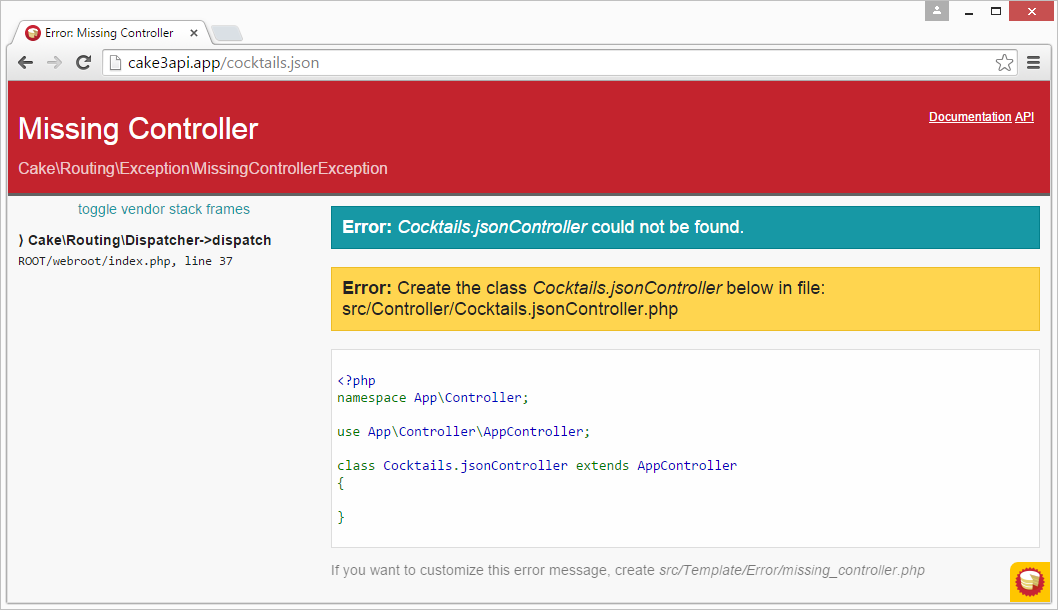
If things went well your API resources should no longer be accessible using the default routes.
To verify query http://cake3api.app/cocktails.json as used in the previous tutorial. If things
went will it:
- Should no longer produce a JSON/XML response
- Should instead show an HTML
MissingControllerexception similar to the one below
3. Test non-API access
Even though we have restricted API access to the /api prefix all non-API requests should still
function as expected.
To verify browe to http://cake3api.app/cocktails which should still produce the familiar
CakePHP index page:

Additional reading
- Follow-up tutorial How to add JWT Authentication to a CakePHP 3 REST API
- Git repository with working end state application as produced by this tutorial
- CakePHP routing documentation
- The CakePHP 3 Book and CakePHP 3 API documentation